Event management software by VNV Events

VNV-Q

One event. One system. One coordinated team.

When doors open, your front desk needs the guest list, your stage manager needs the next cue and your sponsor needs to know who is handling their moment. VNV-Q, powered by Ophyra, keeps them working from the same plan.

Sample run of show

Opening the doors

5:30 PM
Crew briefingProducer · Confirm roles and handoffs
6:00 PM
Guest arrivalWelcome desk · Check in guests and companions
6:30 PM
Sponsor welcomeStage manager · Cue the host and sponsor slide

See VNV-Q in action

Follow the work from the first crew briefing to guest arrival and sponsor follow-up.

Explore the modules
Illustrative event workflows. AI-generated narration.

How we run the event together

Jonathan Moreno leads production at VNV Events and created VNV-Q and the working method behind it. Each year we produce more than 250 small and midsize events in addition to our corporate productions. Our team uses VNV-Q to coordinate catering, décor, multimedia, staffing and logistics.

Five phases from brief to recap

The project phases stay the same. A corporate production uses speaker and budget approvals, while a fundraiser configures registration, volunteer assignments and sponsor benefits.

  1. Discover

    Identify your audience, purpose, budget and the decision that will make the event worth doing.

  2. Design the Scope

    Agree on deliverables, priorities, approvals and the people responsible for each part.

  3. Build the System

    Select vendors, prepare the run of show and give your team its schedule, tasks and guest workflow.

  4. Produce the Event

    Lead setup, brief the crew, call the program and adapt when timing changes.

  5. Close & Recap

    Reconcile the work, deliver the agreed reporting and record what should change next time.

Inside VNV-Q

Explore the tools your producer can include in your agreement. Each module shows how a team would use it at an event.
Run of show

Your producer works with the stage manager to put arrivals, doors, speaker calls and sponsor moments in running order.

At an event

If a welcome speech moves ahead of dinner, the producer tells the stage manager and catering lead which cue changed. Both work from the revised schedule.

Back to modules

Projects & crew tasks

Organize each event as a project. Assign a task to a crew member, track its status and give each person access to the work assigned to their role.

At an event

The floor lead checks the accessible arrival route, marks the task complete and hands the entrance back to the producer before doors open.

Back to modules

Registration & check-in

Agree on the registration rules, collect RSVPs through a branded event page and give authorized staff the guest list. Staff can find a companion by name and check that person in individually.

At an event

A guest arrives before the person who registered them. The desk verifies the guest and records wristband pickup while the principal remains expected.

Back to modules

Sponsor deliverables

Agree on the sponsor benefits, collect the approved artwork, assign a deadline and coordinate placement or acknowledgment with the event team.

At an event

For a sponsored welcome, the producer confirms the logo file, assigns the stage cue and records the acknowledgment for the sponsor’s recap.

Back to modules

Contacts & follow-up

Authorized project leads can record a contact’s stage, meeting notes and next follow-up. A contact involved in two projects can have a different next step in each one.

At an event

After a booth visitor opts in, the brand team can follow up on the demo they requested. The organizer controls which contacts may be shared.

Back to modules

Donations & volunteers

For selected foundations, the approved support plan can include donation options, volunteer sign-ups and sponsorship opportunities. The organization determines the opportunities it offers.

At an event

A supporter who cannot attend a tournament can use the foundation’s donation flow. Another can register interest in volunteering at the next event.

Back to modules

Mobile team access

In the VNV Events iOS app, clients can check event details and message production. Crew members can see their assigned work and schedule. Access depends on the person’s role.

At an event

A crew member checks their next assignment from the venue while the client sends a question about the program directly to the production team.

Back to modules

Planned module

Vendor registration & management

The proposed module would give vendors one place to register their company, event contact, services and agreed arrival details. Your producer will confirm availability when scoping the event.

Proposed workflow

The intended workflow would let a caterer submit its load-in contact and a floor manager check which vendors still owe arrival information.

Back to modules

Planned module

Contract management

The proposed module would let authorized staff see which agreements are outstanding, who owns the next action and which version was agreed. Your producer will confirm availability.

Proposed workflow

A project lead could see that the venue’s revised agreement is awaiting client review before confirming a production commitment.

Back to modules
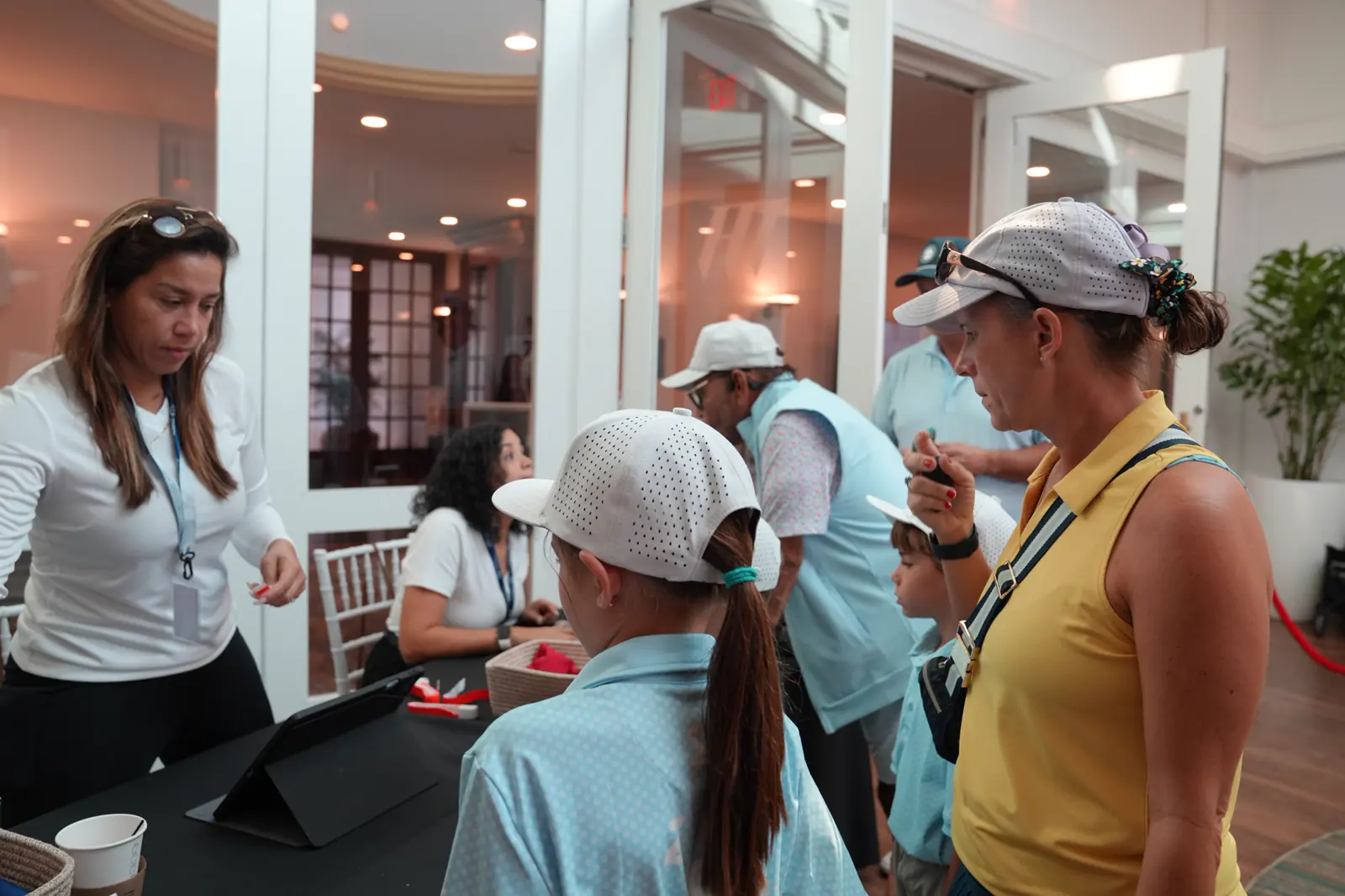
Guests and junior golfers arriving at the Victoria Venezuela Foundation welcome desk
Victoria Venezuela Foundation · 2026 charity golf tournament, Weston

A direct line from the floor to your producer

When a speaker changes the order, open the VNV Events app to check the schedule and message the production team from your phone. Clients can follow their event updates, and crew members see their assigned work.

See the VNV Events iPhone app

An app in your organization's name

A branded app can be part of an agreed production or nonprofit support plan. At Victoria Venezuela Foundation's golf tournament, guests used the foundation's portal or iOS app to RSVP and manage companions. Staff checked arrivals against the same list.

See the foundation's iOS app

Bring VNV-Q to your event

Setup and access to the tools in your agreement are included at no additional cost. Your team can keep using its workspace for future events. We agree on the scope of a dedicated mobile app with you.

Companies and brands

When you hire VNV for production, we set up the workspace around your event or series. Tell us what you are producing and we can walk you through the workflow that fits your team.

Request a VNV-Q walkthrough

Foundations and nonprofits

Apply through Cause on Cue. If your event is selected, the approved support plan defines your guest, volunteer and sponsor tools, any year-round donation features and whether a branded app is included.

Apply for nonprofit support
Chat with us